Agent Foskett • Phishing Email • Display Name Spoofing

The Secure File Came From A Body Contouring Clinic

The email looked like Microsoft.

A secure document was waiting.

Then we checked the sender.

It was not Microsoft.

Agent Foskett phishing email investigation showing display name spoofing and secure document lure
Briefing summary

A fake secure document email used Microsoft styling, the GEMXIT name and urgency to look legitimate. The sender address gave the game away.

Display name: gemxit.com
Sender: info@austinbodycontouring.com
Lure: Access Secure File
🕵️ The display name smiled. The sender address grassed it up.
The email wanted the recipient to trust the name at the top and ignore the address underneath.
Book a security review →

What made the email suspicious

The message looked like a routine secure document notification, but the details did not line up. It claimed to be from GEMXIT, referenced Microsoft, demanded immediate attention and then arrived from a completely unrelated sender address.
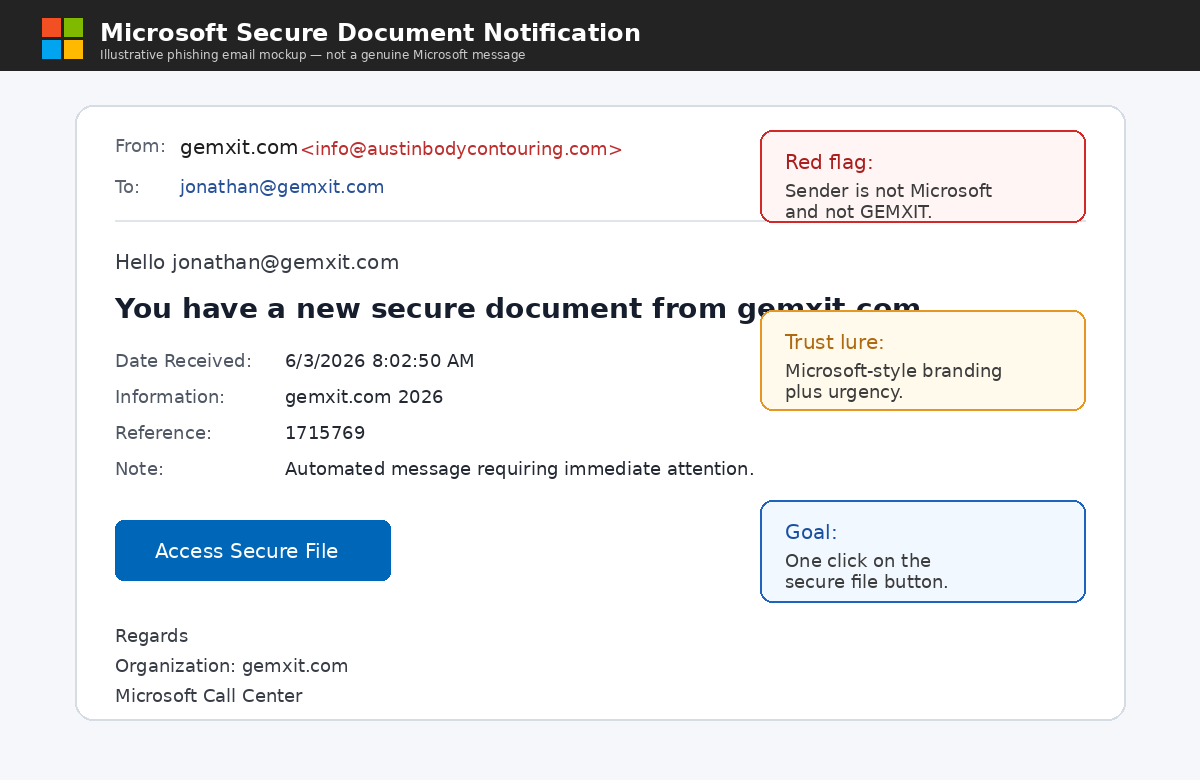
The sender did not matchThe display name said gemxit.com, but the real sender address was info@austinbodycontouring.com. That mismatch is where the investigation started.
The urgency was artificialThe email said the message needed immediate attention. That pressure is designed to make the recipient click first and investigate later.
The thread was a distractionBelow the phishing lure was an unrelated hearing aid appointment conversation. It made the email look lived-in, but it did not belong to the secure document claim.

The Email Looked Like Microsoft

The phishing email was designed to imitate a Microsoft secure document notification. It used familiar branding, Windows-style imagery, a reference number, a timestamp, a large call-to-action button and a fake Microsoft Call Center signature.
Illustrative fake Microsoft secure document phishing email claiming to be from GEMXIT
What it was trying to do

The email wanted the reader to recognise Microsoft branding first and question the sender second. The body looked professional. The sender address told a very different story.

Microsoft-style visual trust
Secure document urgency
Sender mismatch exposed it
Microsoft BrandingThe message used familiar Microsoft-style logos and wording to create trust.
Secure Document LureThe email suggested a document was waiting and required immediate attention.
Professional AppearanceReference numbers, timestamps and corporate language made the email feel legitimate.

The Email Wanted One Click

The message never explained what the document contained, who created it or why it had been shared. Instead, everything revolved around a single action:
Access Secure File
The Microsoft branding created trust. The secure document wording created curiosity. The urgency created pressure. The button created opportunity.

The clue hiding in plain sight

Display names are not proof of identity. Attackers know users often read the friendly name and ignore the technical sender address. That is exactly what this message relied on.
Claimed identitygemxit.com
Actual senderinfo@austinbodycontouring.com
Agent Foskett translationThe email contained Microsoft branding, a secure document notification, a timestamp, a reference number and a professional appearance. The email claimed GEMXIT had sent me a secure document. Which was interesting. Because I own GEMXIT. Usually I know when we've sent something.

First hunt: find secure document lures

Start by searching for common secure document wording. These phrases often appear in credential harvesting campaigns, fake SharePoint messages, fake Microsoft document portals and copied secure file notifications.
secure-document-lure-hunt.kql
  1. 1
  2. 2
  3. 3
  4. 4
  5. 5
  6. 6
  7. 7
  8. 8
  9. 9
  10. 10
  11. 11
  12. 12
  13. 13
EmailEvents
| where Timestamp > ago(7d)
| where Subject has_any ("secure document", "secure file", "secure documents")
| project Timestamp,
          SenderFromAddress,
          SenderMailFromAddress,
          RecipientEmailAddress,
          Subject,
          DeliveryAction,
          ThreatTypes
| order by Timestamp desc
What to reviewCompare the display name, sender address, recipient, delivery action and threat classification. The subject may look normal, but the sender path may not.
Why it mattersSecure document lures are effective because they imitate normal business workflows.
Best next pivotUse NetworkMessageId to pivot into URLs, clicks, post-delivery events and campaign-level evidence.

Second hunt: compare the brand name to the real sender

This hunt looks for messages where the brand or organisation appears in the display name or subject, but the envelope sender does not belong to that organisation.
display-name-spoofing-check.kql
  1. 1
  2. 2
  3. 3
  4. 4
  5. 5
  6. 6
  7. 7
  8. 8
  9. 9
  10. 10
  11. 11
  12. 12
  13. 13
  14. 14
  15. 15
EmailEvents
| where Timestamp > ago(30d)
| where SenderFromAddress has "gemxit"
    or Subject has "gemxit"
| where SenderMailFromAddress !has "gemxit"
| project Timestamp,
          SenderFromAddress,
          SenderMailFromAddress,
          Subject,
          RecipientEmailAddress,
          NetworkMessageId
| order by Timestamp desc

Third hunt: review authentication evidence

Authentication results often tell the part of the story the email body hides. SPF, DKIM, DMARC and composite authentication can help explain whether a message passed, failed or aligned poorly.
authentication-results-review.kql
  1. 1
  2. 2
  3. 3
  4. 4
  5. 5
  6. 6
  7. 7
  8. 8
  9. 9
  10. 10
  11. 11
  12. 12
EmailEvents
| where Timestamp > ago(30d)
| where AuthenticationDetails has_any ("dmarc=fail", "spf=fail", "dkim=fail")
| project Timestamp,
          SenderFromAddress,
          SenderMailFromAddress,
          RecipientEmailAddress,
          Subject,
          AuthenticationDetails
| order by Timestamp desc

Fourth hunt: inspect the secure file link

Do not click the link manually. Use telemetry. Pivot from the email to URL evidence and check where the secure file button was trying to send the recipient.
secure-file-url-pivot.kql
  1. 1
  2. 2
  3. 3
  4. 4
  5. 5
  6. 6
  7. 7
  8. 8
  9. 9
  10. 10
EmailUrlInfo
| where Timestamp > ago(7d)
| where NetworkMessageId == "paste-network-message-id-here"
| project Timestamp,
          NetworkMessageId,
          Url,
          UrlDomain
| order by Timestamp asc

Why attackers include old email threads

The copied HearingLife conversation was not random noise. It was credibility theatre. Attackers often reuse stolen or harvested conversations to make a phishing message feel like part of a real business exchange.
It adds realismA long email chain can make a fake message look like a continuation of something legitimate.
It distracts the readerThe recipient may skim the thread and assume there is context, rather than questioning why the conversation is unrelated.
It suggests compromiseA reused conversation may indicate a compromised mailbox, a harvested thread or content taken from a previous breach.

The Agent Foskett investigator mindset

Do not let the display name do the talking. Expand the sender. Check the authentication. Pivot to URLs. Review the message path. Then ask whether the story in the body matches the evidence in the headers.
Start with identityWho does the message claim to be from, and who actually sent it?
Challenge the lureSecure document, voicemail, invoice and shared file messages are common because they sound normal.
Trust the telemetryThe body was trying to tell one story. The sender address was telling another.

How GEMXIT approaches phishing investigations

GEMXIT helps organisations investigate phishing emails using Microsoft Defender XDR, Defender for Office 365, Microsoft Sentinel, KQL and practical investigation workflows.
We review message evidenceSender identity, authentication results, URLs, attachments, delivery actions and post-delivery changes all matter.
We build practical KQL huntsWe help teams turn suspicious emails into repeatable searches across EmailEvents, EmailUrlInfo, UrlClickEvents and post-delivery telemetry.
We improve awarenessWe help users understand the difference between a friendly display name and a real sender identity.
The secure file was not secure. The sender was not GEMXIT.
GEMXIT helps organisations investigate phishing emails, Microsoft Defender XDR telemetry, email authentication, KQL and real-world attack paths.
Contact GEMXIT

Final thought

The email looked legitimate.

The sender did not.

The display name lied.

The logs already knew.
At GEMXITWe help organisations investigate Microsoft Defender XDR, Defender for Office 365, Microsoft Sentinel, email authentication, phishing campaigns and KQL threat hunting workflows.
Agent Foskett mindsetThe question is not only: “Does the email look familiar?”

It is: “Who actually sent it?”

The Secure File Came From A Body Contouring Clinic

This Agent Foskett investigation explains how a phishing email used display name spoofing, a fake secure document lure, Microsoft wording and an unrelated copied email thread to impersonate GEMXIT.

Microsoft Defender XDR phishing email investigation with KQL

GEMXIT helps organisations investigate phishing emails using EmailEvents, EmailUrlInfo, UrlClickEvents, AuthenticationDetails, SenderFromAddress, SenderMailFromAddress and Microsoft Defender Advanced Hunting workflows.

Display name spoofing and secure document lures

Display name spoofing works because users often trust the friendly name shown in the inbox. Security investigations should compare the claimed sender, actual sender, authentication results, URLs and post-delivery evidence.